LIFEDASH
YOUR MEETINGS. YOUR DATA. YOUR MACHINE.
A LIVING BRAIN DOES THE REST.
Turn every meeting into a private, connected workspace with a Digital Twin, a living knowledge map, and answers you can trace back to the source.
YOUR MEETINGS BECOME
A LIVING SYSTEM.
A meeting that keeps working after it ends, from the first word to the next right action. Free for personal use, source-available, and local by default.
The session is the app
A recording opens as a full workspace: Transcript, Board, and Brain on one switchable canvas. The brief, action items, proposals, and activity stay alongside the conversation that created them.
Sprint Planning Q3
Transcript
A Digital Twin that learns with you
Author a profile of the professional you are, then let your Twin support live assistance, triage, and briefs in your vocabulary. It learns durable facts from finished sessions, and its memory opens as an explorable tree: a branch per category with an honest count, every fact on its own line beside the session that taught it, and one click to forget.
TWIN
Mirrors your work, language, and priorities
LOCAL MEMORY
LEARNING ON
YOUR PROFESSIONAL OPERATING PROFILE
AI & AUTOMATION ARCHITECT
Direct, evidence-led, and focused on decisions that survive beyond the meeting.
Watch your knowledge connect
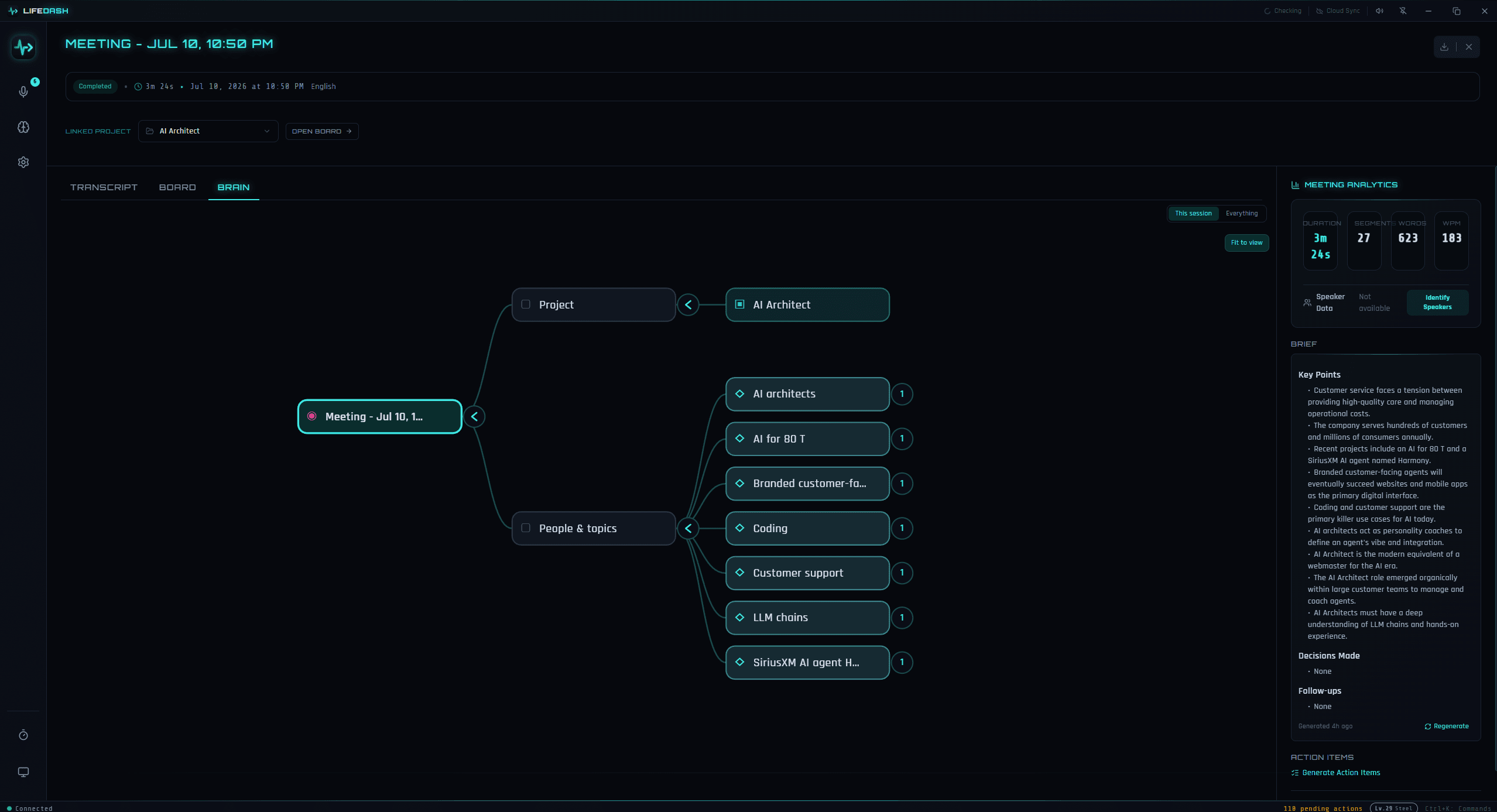
The Living Brain turns sessions, projects, cards, decisions, people, and topics into a local, collapsible mind map. It grows as you work, and every important node can lead you back to the source conversation.
Ask what your meetings know
Search across sessions, transcripts, briefs, cards, and projects. Semantic search finds meaning beyond exact wording, while Ask returns a concise answer with citations or plainly says when the answer is not in your sessions.
Ask anything across your work…|
↵ ASKCLICK THE FIELD TO ASK YOUR WORKSPACE
A board that follows the conversation
Turn action items into cards without leaving the session. The relevant board is right there while you meet, then stays connected to the transcript, decisions, and context that explain why the work exists.
Private by design, not by promise
Audio, transcription, reasoning, embeddings, and memory stay on your device by default. Cloud is a clearly labelled, per-task choice, never a silent default. Your keys stay in OS-level secure storage.
ONE SESSION. A LIVING SYSTEM.
From conversation to context you can use, verify, and revisit.
MEET
Record a conversation and open it as a full workspace, with the transcript, brief, action items, and live activity in one place.
CONNECT
Your Digital Twin and the session workspace turn what was said into proposals, board cards, decisions, and reusable context while keeping you in control.
RECALL
Search or ask across your own sessions later. The Living Brain keeps the links visible, and every answer can point back to where it came from.
UP AND RUNNING IN 60 SECONDS.
WINDOWS 10+ • macOS 12.3+ (BETA) • ~235MB • FREE FOR PERSONAL USE • SOURCE-AVAILABLE
LOCAL BY DEFAULT.
EXPLICIT BY CHOICE.
Your sessions, local reasoning, embeddings, and memory can stay on your machine. If you choose cloud AI, LifeDash tells you at the task where data would leave.
Built for anyone who wants useful AI without handing their conversations to someone else's server by default.
YOU DECIDE WHERE
AI RUNS.
AI is built in — LifeDash runs a local model on your machine from setup, no key or account required. Prefer the cloud or your own runtime instead? Switch any time; you always choose the provider, model, and data boundary.
BUILT-IN SETUP WIZARD
LifeDash guides you through adding keys, choosing a local provider, assigning models to tasks, and managing Whisper models. Keep a task local or choose a cloud provider deliberately.
FREQUENTLY ASKED
A PRIVATE MEMORY,
NOT ANOTHER BOT.
Meeting transcription is just the beginning. LifeDash turns sessions into a private, connected system for decisions, follow-through, and answers you can verify. It is free and local by default.
| OTTER | FIREFLIES | FATHOM | LIFEDASH | |
|---|---|---|---|---|
| Local processing | ||||
| Default processing model | Cloud | Cloud | Cloud | Local-first |
| Works offline | ||||
| Built-in local AI (no API key) | ||||
| Meeting transcription | ||||
| AI briefs & summaries | ||||
| Action item extraction | ||||
| Calendar-aware recording — no bot joins your call | Bot joins call | Bot joins call | Bot joins call | No bot |
| Project management | ||||
| Learning digital-twin assistant | ||||
| Ask your meetings (cited, local) | ||||
| Your own AI key (optional) | ||||
| Source available | ||||
| Source-available license | PolyForm NC |
Product defaults reviewed July 2026. Vendor capabilities can change.
BUILT IN THE OPEN.
OWNED BY YOU.
LifeDash is source-available under the PolyForm Noncommercial License 1.0.0 and developed on GitHub. No hidden features, no artificial limits, no vendor lock-in.
Commercial use requires a license. Get in touch: riegerdaniel@ymail.com
Releases up to and including v2.5.0 remain available under AGPL-3.0.
POLYFORM NONCOMMERCIAL
Free for personal and noncommercial use — individuals, hobby projects, charities, educational and government institutions. Commercial use requires a license.
GITHUB-FIRST
All issues, discussions, and roadmap are public. Development happens in the open.
SHARE IDEAS & PROMPTS
Have a workflow idea or a great AI prompt? Share it on GitHub Discussions. Your ideas shape what gets built next.
TRANSPARENT
No hidden features, no artificial limits, no telemetry. Read every line of code.
SELF-CONTAINED
No external services required. The built-in local AI runtime needs no key, no second app, and no account. Bring your own provider instead if you prefer.
KEEP THE CONTEXT.
LOSE THE CLOUD.
Download LifeDash and turn your meetings into a private workspace, a living knowledge map, and real follow-through. Free for personal use · Source-available.
PolyForm Noncommercial licensed. Local by default. Cloud only when you choose it.